A Quick Look Into How React Native Works

How JavaScript and the Virtual DOM work together with native rendering to enable cross-platform mobile development? 🤔
A Quick Look into React Native Principles
Cross-Platform Technology
Write once, run everywhere
- Save manpower, speed up iteration, support rapid business growth
- Web development is the most common cross-platform technology
Advantages
- No release required (you can see the effect immediately after development and going online)
- Save manpower (no need to invest different manpower for multiple platforms)
- Fast iteration (front-end development with HTML and CSS is much faster than native client development)
Disadvantages
- Experience and performance are worse than native applications
- Difficult to optimize (usually involves modifying the browser kernel, with very limited improvements)
Comparison: Web Development vs Native Development
- Web: developed with dynamic languages, generating web views
- Native: developed with static languages, generating native views
👉 Can we combine the advantages of Web development and Native development: use dynamic languages to generate native views? 🧐
Core Principle
🤩 How to generate native views through JS?
Virtual DOM
- A JS object describing the user interface
- Platform-independent
- Based on the separation of Virtual DOM and Renderer, React encapsulates platform-specific rendering logic in the Render layer to handle platform-related view rendering.
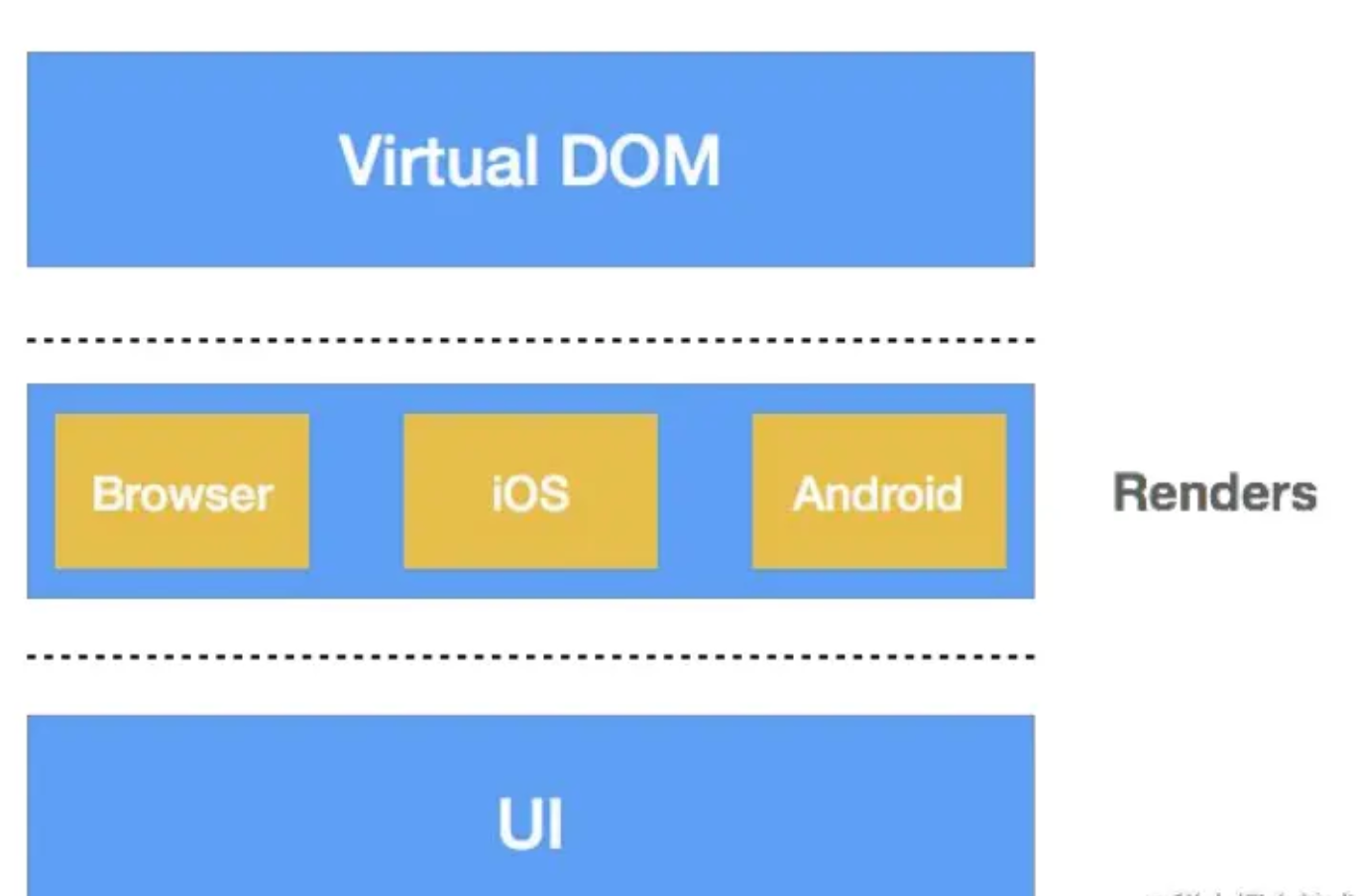

Put different base libraries in the Render! We only need to care about how to write the Virtual DOM.
How the Browser Creates Views
How to Represent a React Element
Two ways to pass React elements into the ReactDOM.render method, rendering them into a specified HTML element in the browser:
// case 1
class App extends React.Component {}
ReactDOM.render(<App />, document.getElementById("container"));

// case 2
ReactDOM.render(<h1>Hello world</h1>, document.getElementById("container"));
In React, an element is represented as an object:
var element = {
  // This tag allows us to uniquely identify this as a React Element
  $typeof: REACT_ELEMENT_TYPE,

  // built-in properties that belong on the element
  type: type, // the type of this element
  key: key, // the identifier of this element
  ref: ref, // the reference of this element
  props: props, // element’s properties (children means sub-elements)

  // Record the component responsible for creating this element
  _owner: owner,
};
Converted form:
// Case 1
<h1><p>Hello world</p></h1>
{
    type: 'h1',
    props:{
        children: {
            type: 'p',
            props: ['Hello world']
        }
    }
}

// Case 2
<App/>
{
    type: App, // Component
}
React Element Classification
Atomic Type (corresponds to case 1)
typeis a string- Smallest granularity, structurally indivisible
- Rendering: supported by the platform layer
- In the browser: basic HTML tags
- In Native: basic UI components
Composite Type (corresponds to case 2)
typeis a function constructor (Virtual DOM generator), provides custom UI and behavior- Rendering: create an instance with the constructor, run its render method to get a new element, then render it
Renderer Workflow
For different types, the renderer provides different classes.
instantiateComponent: creates different renderer instances based on thetype.Flow
- Virtual DOM Element ↓
- instantiateComponent ↓
- Internal Component Instance ↓
- Generate Real DOM Fragment ↓
- Insert DOM Fragment into DOM Tree
Component Types
In Browser Environment
ReactDOMTextComponentReactDOMComponentReactCompositeComponent
In Native Environment
ReactNativeTextComponentReactNativeBaseComponentReactNativeCompositeComponentFor example, if it’s a text element →
ReactDOMTextComponentin browser environment
Example
Render the following React elements:
class App extends React.component {
  render() {
    return (
      <div>
        <h1>Welcome Page</h1>
        <Welcome name="Yaphet" />
      </div>
    );
  }
}

class Welcome extends React.Component {
  render() {
    return <h2>{this.props.name}</h2>;
  }
}

ReactDOM.render(<App />, document.getElementById("container"));
Process:
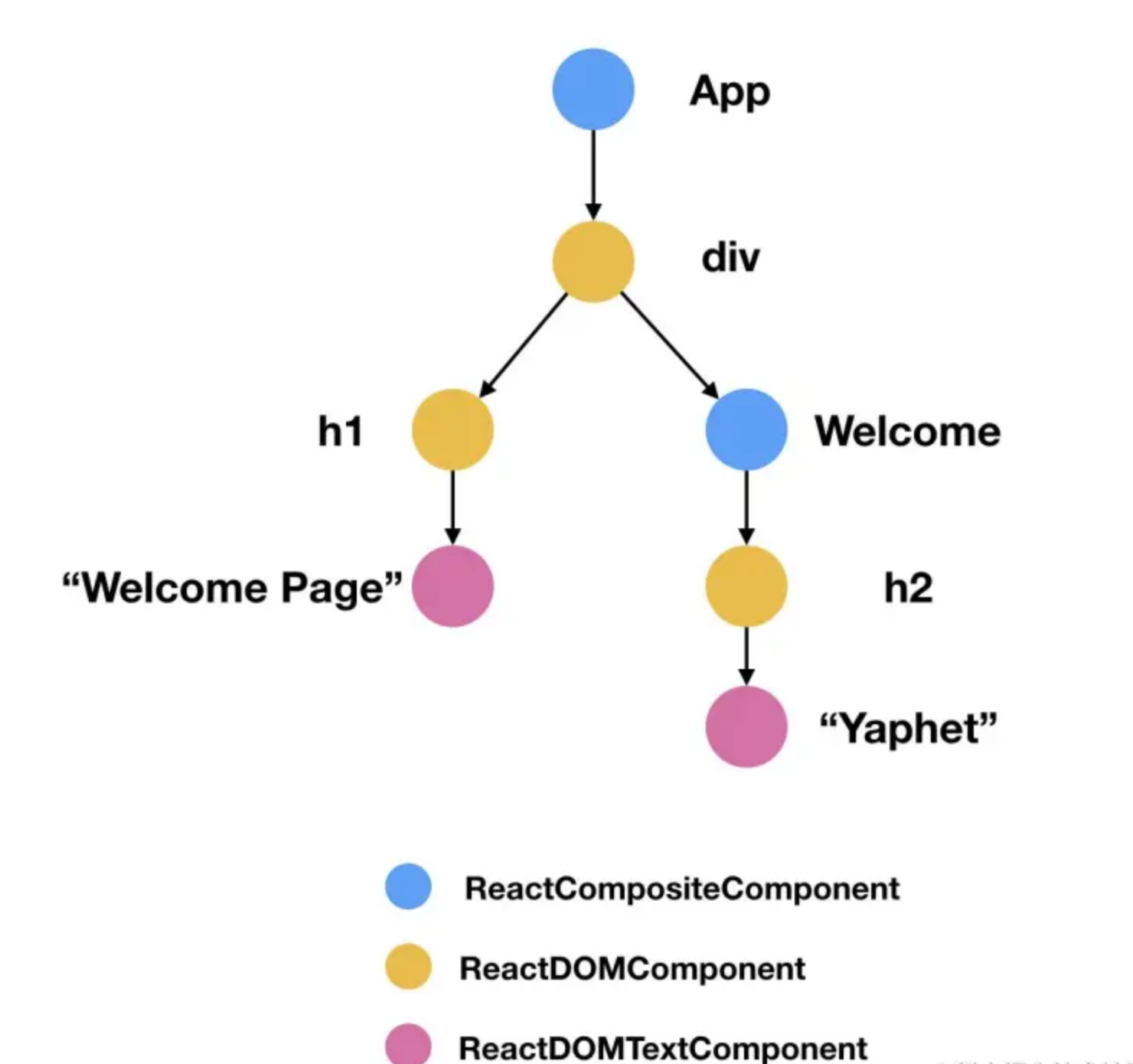
- Pass to ReactDOM’s render method
- Instantiate the corresponding renderer (ReactCompositeComponent) → get App node (top)
- App node → based on
type(constructor) → create instance → run render → get first element inside - Get
<div>→ create corresponding renderer (ReactDOMComponent) → render into a real DOM node - Get child elements → instantiate renderers recursively → render DOM nodes
- … and so on down the tree 🌲 …
😍 Summary: In the browser, UI is created via DOM API.
How Native Creates Views
JavaScript Engine
- Create JavaScript context:
JSContext *context = [[JSContext alloc] init]
- Execute code inside the context:
[context evaluateScript:@"var triple = function(value) { return value + 3 }"];
- Native calls JavaScript:
JSValue *tripleFn = context[@"triple"]
JS exposes functions/variables globally → Native can access them. Similarly, for JS to use Native, Native must also expose its functions/variables globally.
React Native JS-Native Communication
In React Native, to avoid polluting the global context with too many modules:
- React Native exposes only one object:
_fbBatchedBridge - Inside it: method
callFunctionReturnFlushedQueue - Native → JS: Native can pass the module name, method name, and parameters to this method → JS executes corresponding module

- JS → Native: also via an intermediate method calling the corresponding module
JS Creates Native UI in React Native
- Call UI Manager module’s
createViewmethod → pass parameters → create client-side view - Styles in React Native are represented by objects, passed as key/value pairs to Native, parsed and rendered by Native
😍 Summary:
- JS engine bridges to Native code
- On Native side, UI Manager creates corresponding views